
A plain-English guide for Shopify and WooCommerce (WordPress) powered online shops.
Here’s a question worth sitting with: if a customer searched for exactly what you sell right now, on Google or Instagram, would your store even show up?
For most Nigerian store owners, the honest answer is no. Not because the product is wrong, or the price is off, but because the store is invisible in all the places that matter. Prices are in Naira, the payment gateway works, logistics is sorted, and still, sales stay flat and traffic shows up in unpredictable spurts.
The problem almost never lives in the product. It lives in the wiring around it. An e-commerce store without proper integrations is a shop with no signboard, no Google Maps pin, no record of who walks in, and no one answering the phone. Open for business. Invisible to everyone outside.
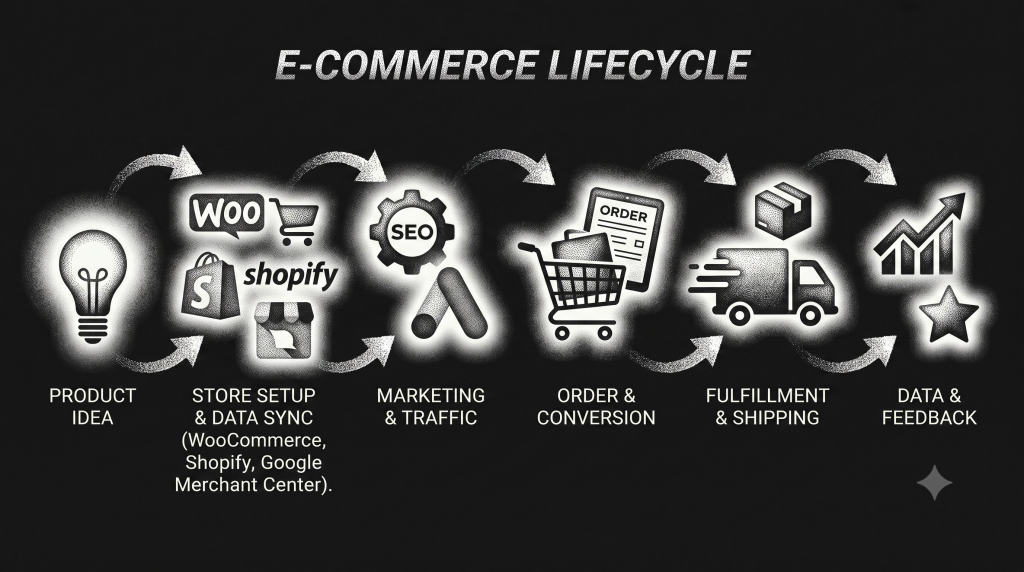
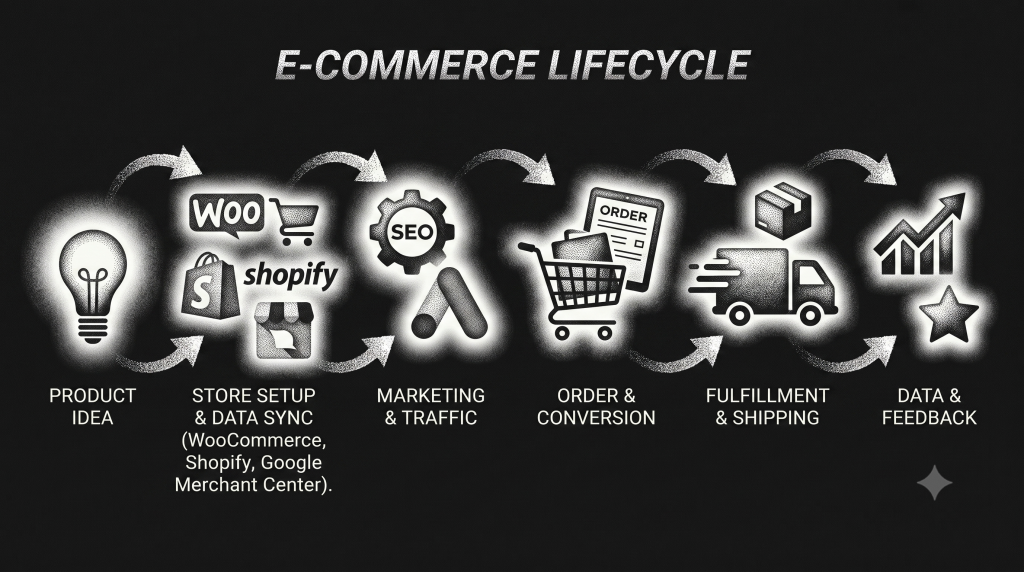
This guide closes that gap. Every integration a Nigerian store needs in 2026, explained without the jargon, with a 7-day checklist you can actually work through, on either Shopify or WooCommerce (WordPress).
Why this matters right now
Nigeria had around 107 million internet users at the start of 2025 (DataReportal, Digital 2025: Nigeria), and Google handles roughly 98 to 99% of all web searches in the country (StatCounter). In practical terms, that means Google is close to the only front door your store has. If your store isn’t set up to be found there, trusted there, and listed there, you’re relying entirely on ads and social media to do all the work.
Integrations fix three specific problems Nigerian stores face:
• Trust: A verified business listing, visible reviews, and recognisable local payment logos tell a first-time visitor this is a real business.
• Friction: Automated shipping rates, order tracking, and a working WhatsApp line remove the small frustrations that make people abandon checkout.
• Visibility: Stores that show up in search, in Google Shopping, and in Meta’s shopping surfaces get free, ongoing traffic that ad-only stores never see.
Choose your foundation: Shopify or WooCommerce
Chances are you’ve already chosen and set up either of both. For businesses just starting out, both platforms can support everything in this guide. The difference is control, cost, and who you’ll need on your team. The comparison table below is for you:
| Factor | WooCommerce | Shopify |
| Control | Runs on WordPress, so you can customize almost anything, including blog content and URLs | More structured and restrictive; faster to set up, less to configure |
| Local payments | Paystack and Flutterwave plugin directly, no extra markup | Needs a third-party app; Shopify’s own payment system isn’t available to Nigerian businesses |
| Currency | Bills and prices natively in Naira | Bills you in US Dollars, so your costs move with the exchange rate |
| Hosting | You choose your host; Nigerian hosting providers are available from roughly ₦50,000to ₦150,000 a year. Dreamhost is my go to recommendation | Hosting is included and fixed,no choice involved |
| Local shipping | Nigerian logistics plugins(Shipbubble and some others)calculate state-by-state rates automatically | Rates are usually set manually or through a limited set of apps |
| Typical cost | ₦50,000 to ₦150,000 a year, plus a developer if you want custom work | $29 to $39 a month (roughly$348 to $468 a year), plus currency risk and transaction fees |
In short: WooCommerce gives you more control and lower long-term cost, but needs more hands-on setup or a developer. Shopify is faster to launch and easier to maintain, but costs more over time and locks you into USD billing.
Whichever you choose, everything below still applies. Where the setup steps differ, I’ve noted it.
Get found by Google + AI
Search Engine Optimization (SEO) is the only kind of traffic that keeps growing after you stop paying for it. Ads stop the moment your budget runs out; a well-set-up store keeps showing up in search long after. Luckily, the same tactics/strategies for great SEO also help with ranking with AI models.
What to do (or ask your developer/agency to do):
☐ Install an SEO plugin. On WooCommerce, Rank Math’s free plan is a strong choice and includes product-level search features that competitors often charge for. On Shopify, use one of the SEO apps in the Shopify App Store.
☐ Make sure your product and category URLs are readable (yourstore.com/product/blue-sneakers), not strings of random numbers and symbols.
☐ Add a short paragraph of original text above your category pages (for example, above your “Laptops” grid), describing what you sell there in Nigeria-specific language like “buy laptops in Lagos.” This helps you rank for broader searches, not just exact product names.
☐ Compress your product images before uploading (a free tool like TinyPNG works) and name the files descriptively, like hp-laptop-15-silver.jpg instead of IMG_2093.jpg. On slower mobile connections, which are still common across Nigeria, a faster-loading store keeps more customers through checkout.
☐ Make sure your store’s structured data (the behind-the-scenes information Google reads about your products) shows prices in Naira and your business address in Nigeria. This is technical, so it’s worth handing to a developer, but it directly affects whether you show up in local search results and rich listings like star ratings.
☐ If you serve both English and Pidgin-speaking customers, or multiple regions, ask your developer about setting up regional language tags so Google shows the right version to the right audience.
Why it matters: none of this is automatic. Neither Shopify nor WooCommerce configures Nigeria-specific details out of the box. Getting this right is what allows Google to understand where you are, what you sell, and in what currency, which improves your odds of appearing in rich results and free product listings.
Understand what your customers actually do
You can’t fix a leaky checkout you can’t see. Two free tools (Google Analytics & Microsoft Clarity) show you exactly where customers hesitate, scroll, or give up. They let you compare website traffic data and make your own decisions. Do not set them up and ignore them, review the data month on month, compare months to months, weeks to weeks; investigate traffic spikes and dips.
Google Analytics 4 (GA4)
Tracks how visitors move through your store: what they view, what they add to cart, and what they buy.
☐ Install the official analytics plugin (WooCommerce) or connect GA4 through your store settings (Shopify: Online Store → Preferences → Google Analytics).
☐ Turn on e-commerce tracking so you can see product views, add-to-cart actions, and completed purchases.
☐ Set up a cookie consent banner so tracking only starts after a visitor agrees, which Nigeria’s data protection law requires.
☐ Exclude your own team’s visits from your data. Store owners tend to check their own site many times a day, and those visits quietly distort your real conversion numbers.
Microsoft Clarity
A free tool that records anonymised sessions and shows you heatmaps of where people click and scroll.
☐ Sign up at clarity.microsoft.com and create a project.
☐ Add the tracking code to your theme (WooCommerce: theme editor or a code-snippet plugin; Shopify: theme code editor, in the page header).
☐ Load it only after cookie consent, same as GA4.
Why it matters: watching a handful of session recordings often reveals the exact problem behind a high cart-abandonment rate, whether it’s a payment form that breaks on a slow connection or a checkout step that asks for something customers don’t have.
Claim your business on Google
Google Search Console
Free, and there’s no good reason to skip it. It shows you which searches bring people to your store, and flags pages Google is struggling to read.
☐ Register your store at search.google.com/search-console.
☐ Verify ownership (the easiest method is usually pasting a code into your theme, but your developer can advise on the most reliable option).
☐ Submit your sitemap (WooCommerce’s SEO plugin generates this automatically; Shopify creates one automatically at /sitemap.xml).
☐ In the settings, set your target country to Nigeria.
☐ Keep an eye on your “Core Web Vitals,” Google’s page-speed report, using the free PageSpeed Insights tool. A slow mobile site is a ranking and a conversion problem at the same time.
Google Business Profile
If you have a shop, warehouse, or delivery base, this is what shows up when someone searches “near me” or looks at Google Maps.
☐ Claim your listing at google.com/business.
☐ Fill in your Nigerian phone number, address, category, and hours.
☐ Upload real photos of your storefront, products, or delivery team.
☐ Post updates regularly (offers, new arrivals, delivery news).
☐ Encourage customers to leave reviews here, not just on your website.
Why it matters: many Nigerian searches include a location (“in Lagos,” “near me,” a specific area), and a complete, active Business Profile is what captures that traffic, whether it turns into an online order or a walk-in.
Put your products in front of shoppers for free
Google Merchant Center
This is what lets your products appear in Google Shopping and in free product listings on Google Search and Images, not just paid ads.
☐ Create an account at merchants.google.com and verify your domain.
☐ Fill in your business name, address, phone number, and support link.
☐ Set your shipping and tax details for Nigeria, and set your feed currency to NGN.
☐ Create a product feed (Shopify: the Google & YouTube app; WooCommerce: a product feed plugin such as CTX Feed or Google Listings & Ads).
☐ Submit your feed and wait for approval, which usually takes about a week, sometimes longer for newer Nigerian businesses.
☐ Once approved, you can link it to Google Ads for paid campaigns, but the free listings alone are worth setting this up for.
Things that commonly go wrong:
• The prices in your feed don’t match the prices on your actual product pages. This gets your listings rejected.
• Shipping to Nigeria isn’t configured, so your products silently don’t show up.
• Your return policy isn’t on a clear, working page. Merchant Center checks for this.
• New accounts sometimes face longer verification, especially around confirming your phone number and address. Using a verifiable, CAC-registered address helps.
Microsoft Merchant Center (optional, second priority)
Microsoft’s shopping network is much smaller in Nigeria, so treat it as a supplement once Google Shopping is working, not your starting point. You can usually import your product feed directly from Google Merchant Center rather than building a second one from scratch.
Sell where people already scroll
Nigerian shoppers don’t only find products through search. A lot of discovery happens on Instagram and TikTok, and trust often gets built in WhatsApp conversations before a sale closes.
Meta Commerce Manager (Facebook and Instagram Shopping)
Turns your Facebook Page and Instagram account into a shoppable storefront, for free.
☐ Set up a Meta Business Account at business.facebook.com.
☐ Create a Commerce Account inside Commerce Manager.
☐ Connect your product catalog (Shopify has a native Facebook & Instagram sales channel; WooCommerce needs the Facebook for WooCommerce plugin).
☐ Set checkout to redirect to your own website, where Paystack or Flutterwave handles payment. On-site Meta checkout has limited support in Nigeria, so this off-site setup is the more reliable option.
☐ Tag products in your posts and Reels.
☐ Turn on Shops for organic discovery on both Facebook and Instagram. Common pitfalls: a missing or broken return/shipping policy link is the most frequent reason a catalog gets rejected. Also, don’t sync your catalog from two places at once (say, both Shopify and a separate feed); pick one source so your listings don’t conflict.
WhatsApp Business
For many Nigerian stores, this is where the actual sale happens: a customer discovers you on social media, moves to WhatsApp to ask questions, and completes the purchase there or through a bank transfer.
☐ Choose a WhatsApp Business Solution Provider (examples include AiSensy, Wati, DelightChat, and Trengo) to send automated messages at scale.
☐ Apply for a WhatsApp Business API account through your chosen provider.
☐ Set up message templates for order confirmations, shipping updates, and abandoned-cart reminders.
☐ Add a WhatsApp chat button to your store (a simple wa.me/234XXXXXXXXXX link works, or a floating chat widget).
☐ Only message customers who gave you their number at checkout. Unsolicited bulk messages breach both Meta’s policy and Nigeria’s data protection law, and can get your number banned.
A note on cost: WhatsApp’s Business API charges per conversation, and pricing varies by provider. Confirm current Naira pricing directly with your chosen provider before committing, since rates change.
Get paid
Shopify’s own payment system isn’t available to Nigerian-registered businesses, so both platforms rely on local gateways.
| Gateway | Good For | Local Card Fee | International Card Fee |
| Paystack | Cards, bank transfer,USSD, mobile money | 1.5% + ₦100 (capped at ₦2,000; waived under ₦2,500) | 3.9% + ₦100 |
| Flutterwave | Multi-currency, cross-border sales | Roughly 1.4 to 2% | Roughly 3.8 to 4.8% |
| Monnify (by Moniepoint) | Virtual accounts, flexible payout timing | Check current published rate | Check current published rate |
| Opay | Mobile money wallet users | Check current published rate | Check current published rate |
Fees change periodically, so confirm the current rate on each provider’s own pricing page before you commit. VAT of 7.5% typically applies on top of processing fees under Nigerian tax rules.
Setup steps:
☐ Register a business account and complete KYC (CAC certificate, ID, proof of address, bank details).
☐ Get your live and test API keys.
☐ Install the gateway’s app (Shopify) or plugin (WooCommerce) and enter your keys.
☐ Run a few test transactions before going live.
Deliver without drama
| Provider | Coverage | Known for |
| ShipBubble | International | WooCommerce & Shopify Plugin that gives you multiple courier partners. API integration, branded tracking, the entire valuation. |
| Sendbox | Nationwide and international | Built specifically for Nigerian e-commerce |
| Topship | Local and cross-border | Branded delivery notifications |
| GIGL | Nationwide | API integration, cash on delivery, branded tracking |
| DHL Nigeria | International | High-value cross-border shipments |
☐ Register as a business merchant with your chosen provider and complete their KYC.
☐ Get your API credentials and install their plugin or app.
☐ Turn on real-time shipping rates, or set clear flat rates, at checkout.
☐ Enable automated tracking updates for customers.
☐ If you offer Cash on Delivery, double-check customer phone numbers and addresses before dispatch. Incomplete addresses are one of the most common causes of failed deliveries and lost stock.
Build trust with reviews
Social proof matters more when a customer has never bought from you before. Photo and video reviews generally build more confidence than text alone, since they show real people actually receiving the product.
| App | Works with | Free plan? |
| Shopify Product Reviews | Shopify | Yes |
| Judge.me | Shopify | Yes |
| Yotpo | Shopify and WooCommerce | Freemium |
| Loox | Shopify | No |
| Reviews.io | Multi-platform | Yes |
☐ Install a review app and place the widget on your product pages.
☐ Send an automated review request 3 to 7 days after delivery, once the customer has had time to actually use the product.
☐ Turn on review star ratings in your product listings where the app supports it.
☐ Respond to negative reviews publicly and calmly. It reassures future buyers more than deleting the review ever would.
☐ Encourage reviews that mention the actual delivery experience (“arrived in Lagos in 2 days”), since specific, local detail builds more trust than generic praise.
Handle customer data properly
Nigeria’s Data Protection Act (2023) and the NDPR require clear consent before you collect or use anyone’s personal data. This touches almost everything above.
☐ Show a cookie consent banner before GA4, Clarity, or any tracking script loads.
☐ Only send WhatsApp messages to customers who opted in at checkout.
☐ Use hosted checkout from Paystack or Flutterwave so card details never touch your own server, which significantly reduces your compliance burden.
☐ Publish a privacy policy that lists what you collect, why, and for how long.
☐ If any customer data is stored on servers outside Nigeria, get a quick legal opinion from a Nigerian data protection lawyer before assuming it’s fine.
Beyond the legal requirement, this is also a trust signal. Nigerian shoppers are increasingly aware of how their data is used, and a store that’s visibly careful with it stands out.
The 7-Day Launch Checklist
| Day | Focus |
| Day 1 | Install your SEO plugin/app, fix your URL structure, add product schema |
| Day 2 | Install GA4 and Microsoft Clarity, set up your consent banner |
| Day 3 | Verify Google Search Console, submit your sitemap, set your target country to Nigeria |
| Day 4 | Set up your Google Business Profile with accurate local details |
| Day 5 | Create your Google Merchant Center account,build your product feed, submit for approval |
| Day 6 | Set up Meta Commerce Manager, sync your catalog, turn on Shops |
| Day 7 | Connect your payment gateway, shipping provider, reviews app, and WhatsApp chat button |
After day 7: link Merchant Center to Google Ads if you plan to run paid Shopping campaigns, set up automated email flows for abandoned carts, and start testing small changes to your checkout page to see what improves completion rates.
What to track once you’re live
There’s no single official Nigerian benchmark for most of these yet, so the most useful approach is watching your own trend over time rather than chasing an exact number.
• Organic traffic (GA4): should climb steadily over months, not days, as your SEO work takes effect.
• Mobile conversion rate (GA4): worth tracking separately from desktop, since most Nigerian shoppers browse and buy on mobile.
• Cart abandonment rate (GA4 and Clarity): the global average tends to sit around 70% (Baymard Institute), so use that as a rough reference point, then focus on reducing your own number over time.
• Google Shopping click-through rate (Merchant Center): new feeds usually start low and improve as your feed quality (images, titles, pricing accuracy) improves.
• Review volume (your reviews app): a steady stream of new reviews each month matters more than hitting any specific target.
• Page speed (PageSpeed Insights): aim to keep improving your mobile score, since slow pages cost you customers on weaker connections.
Every integration in this guide exists for one reason: to make your store easier to find, easier to trust, and easier to buy from. In a market where Google handles almost all search traffic, where WhatsApp is often the real point of sale, and where most shoppers are on mobile, skipping these steps isn't saving money. It's leaving growth on the table.

Start with SEO and analytics. Add your Merchant Center listing and social shops. Layer in payments, shipping, reviews, and WhatsApp. Each piece makes the next one work better, until your store isn't just online, it's actually findable, trustworthy, and easy to buy from.

Assume your competitors are working through this list already. The only real question is whether you start this week or next.
Need help setting any of this up for your Shopify or WooCommerce store? The WebCoupers team builds and manages e-commerce platforms for Nigerian businesses, from search visibility to full integration. Get in touch.